Recreate the Rapper-Swap Video Trend with MiniMax H3 Max
The two-rappers-swapped clips flooding your feed are one image edit plus one image-to-video call. This guide recreates the trend with Steve Jobs and Bill Gates on MiniMax H3 Max through the LLM Gateway API and the Lounge Video Studio, for about $1.40.
By LLM Gateway

You have seen the clip: two rappers trading verses under a hanging studio mic on a seamless orange set, except the rappers have been swapped for cartoon characters, politicians, or your group chat. The comments always ask the same thing: which model, and how.
The model is MiniMax H3 Max. The how is shorter than most people expect: one image edit to build the opening frame, then one image-to-video call. LLM Gateway exposes both behind a single API key, and the Lounge Video Studio does the same thing without code. We recreated the trend with Steve Jobs and Bill Gates to show every step, including what it cost.
That is 15 seconds at 768p with H3 Max's native audio. Total spend for the frame and the clip: about $1.40.
Why MiniMax H3 Max works for this
H3 Max is a first-frame model. You hand it a still image, describe what happens next, and it renders a 5 to 15 second clip at 480p or 768p with synchronized audio baked in. There is no separate sound pass and no lip-sync tool, which is why the swapped clips have vocals and a beat that match the movement.
The catch is that H3 Max does not take a reference video through LLM Gateway. It
takes image (the first frame) and an optional last_frame. So the trick behind
the trend is to recreate the reference set as a single still image with the new
people in it, then let H3 Max do the performance. If your workflow truly needs a
motion reference, use Seedance 2.x and reference_videos; the
video generation docs
list which models accept which inputs.
Why not edit the original performance with Seedance?
Seedance 2.5 has the obvious tool for this trend: pass the performance as a
reference_videos entry, add identity photos as reference_images, and ask it
to replace the two performers. We tried exactly that through the gateway with
the same clip and the same portraits, and ByteDance refused every variant before
a job was created:
1{2 "error": {3 "message": "The request failed because the input video 'content[2]' may contain real person."4 }5}1{2 "error": {3 "message": "The request failed because the input video 'content[2]' may contain real person."4 }5}That is provider policy, not a gateway limit. ByteDance's own documentation states that Seedance 2.5 and 2.0 do not accept reference images or videos that contain real human faces; real-person assets are only allowed through its portrait library after the depicted person verifies and signs an authorization. Third-party resellers that advertise a "face" variant of Seedance carry that arrangement on their own account. Rejected requests cost nothing, but they also mean a real-face performance swap on Seedance is not something you can build on.
MiniMax H3 Max accepted photographic likenesses of public figures as a first frame without complaint, which is why the rest of this guide uses it. You trade the frame-accurate motion copy for a performance the model invents from your prompt.
Step 1: Build the first frame with an image edit
You need three inputs: a clear portrait of each person and one still of the set
you are copying. We used two Wikimedia Commons portraits and a frame grabbed from
the reference clip at the 8 second mark, then sent all three to gpt-image-2
through the OpenAI-compatible /v1/images/edits endpoint.
1curl -X POST "https://api.llmgateway.io/v1/images/edits" \2 -H "Authorization: Bearer $LLM_GATEWAY_API_KEY" \3 -H "Content-Type: application/json" \4 -d '{5 "model": "gpt-image-2",6 "size": "1536x1024",7 "quality": "high",8 "input_fidelity": "high",9 "images": [10 { "image_url": "data:image/jpeg;base64,<portrait-one>" },11 { "image_url": "data:image/jpeg;base64,<portrait-two>" },12 { "image_url": "data:image/jpeg;base64,<set-still>" }13 ],14 "prompt": "Recreate the studio set from the third image exactly: a seamless bright orange backdrop, a gold vintage condenser microphone hanging from the top center, soft even studio light, wide framing with both performers waist-up. Replace the two performers with the two men from the first and second images, keeping their faces highly recognizable and photorealistic. On the left, the man from the first image: black mock turtleneck, faded blue jeans, round rimless glasses. On the right, the man from the second image: dark rectangular glasses, side-parted grey hair, a light blue crew-neck sweater over a collared shirt. They stand side by side facing the microphone mid-performance like two rappers in a live session. Photorealistic 4K video still, no text, no captions, no logos."15 }'1curl -X POST "https://api.llmgateway.io/v1/images/edits" \2 -H "Authorization: Bearer $LLM_GATEWAY_API_KEY" \3 -H "Content-Type: application/json" \4 -d '{5 "model": "gpt-image-2",6 "size": "1536x1024",7 "quality": "high",8 "input_fidelity": "high",9 "images": [10 { "image_url": "data:image/jpeg;base64,<portrait-one>" },11 { "image_url": "data:image/jpeg;base64,<portrait-two>" },12 { "image_url": "data:image/jpeg;base64,<set-still>" }13 ],14 "prompt": "Recreate the studio set from the third image exactly: a seamless bright orange backdrop, a gold vintage condenser microphone hanging from the top center, soft even studio light, wide framing with both performers waist-up. Replace the two performers with the two men from the first and second images, keeping their faces highly recognizable and photorealistic. On the left, the man from the first image: black mock turtleneck, faded blue jeans, round rimless glasses. On the right, the man from the second image: dark rectangular glasses, side-parted grey hair, a light blue crew-neck sweater over a collared shirt. They stand side by side facing the microphone mid-performance like two rappers in a live session. Photorealistic 4K video still, no text, no captions, no logos."15 }'input_fidelity: "high" is what keeps the faces recognizable. The response
returns the image as b64_json plus a usage block; ours billed $0.19 and
took about 100 seconds.
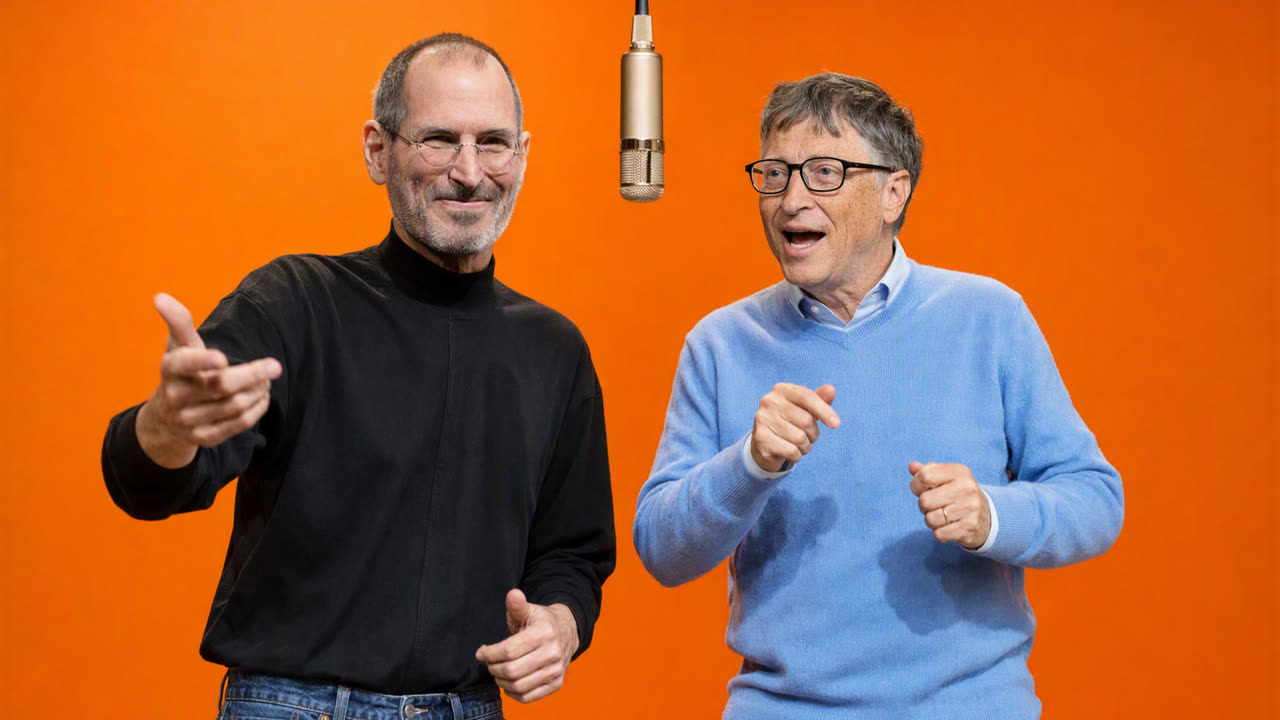
One preparation step before animating: gpt-image-2 outputs 3:2, and H3 Max follows the aspect ratio of the frame you give it. Crop the still to 16:9 first (1536×864) so the clip comes out landscape instead of letterboxed.
Step 2: Animate it with MiniMax H3 Max
Submit the cropped frame as image and describe the performance in the prompt.
The model is minimax-h3-max; seconds can be any integer from 5 to 15 and
size picks the resolution.
1curl -X POST "https://api.llmgateway.io/v1/videos" \2 -H "Authorization: Bearer $LLM_GATEWAY_API_KEY" \3 -H "Content-Type: application/json" \4 -d '{5 "model": "minimax-h3-max",6 "seconds": 15,7 "size": "1366x768",8 "image": { "image_url": "data:image/jpeg;base64,<first-frame>" },9 "prompt": "Two men perform a live hip-hop session in front of a hanging gold studio microphone on a seamless bright orange backdrop. They bounce and groove to an upbeat trap beat, trading rap verses into the mic: the man on the left in the black turtleneck raps first with sharp hand gestures and a confident grin, then the man on the right in the blue sweater takes over with playful ad-libs while the other hypes him up. Both nod, sway and dance in rhythm. Steady camera with a slow push-in, even studio lighting, the microphone stays in frame. Audible rap vocals and a punchy beat. No subtitles, no captions, no on-screen text."10 }'1curl -X POST "https://api.llmgateway.io/v1/videos" \2 -H "Authorization: Bearer $LLM_GATEWAY_API_KEY" \3 -H "Content-Type: application/json" \4 -d '{5 "model": "minimax-h3-max",6 "seconds": 15,7 "size": "1366x768",8 "image": { "image_url": "data:image/jpeg;base64,<first-frame>" },9 "prompt": "Two men perform a live hip-hop session in front of a hanging gold studio microphone on a seamless bright orange backdrop. They bounce and groove to an upbeat trap beat, trading rap verses into the mic: the man on the left in the black turtleneck raps first with sharp hand gestures and a confident grin, then the man on the right in the blue sweater takes over with playful ad-libs while the other hypes him up. Both nod, sway and dance in rhythm. Steady camera with a slow push-in, even studio lighting, the microphone stays in frame. Audible rap vocals and a punchy beat. No subtitles, no captions, no on-screen text."10 }'The job is accepted immediately:
1{2 "id": "lMTODLiIkGUjpYs84owC",3 "object": "video",4 "model": "minimax/minimax-h3-max",5 "status": "queued",6 "progress": 07}1{2 "id": "lMTODLiIkGUjpYs84owC",3 "object": "video",4 "model": "minimax/minimax-h3-max",5 "status": "queued",6 "progress": 07}A few prompt habits that made the difference between a usable take and a throwaway one:
- Name who does what. "The man on the left in the black turtleneck raps first" keeps the model from merging the two performers or swapping their clothes.
- Ask for the audio you want. H3 Max always generates sound, so say "audible rap vocals and a punchy beat" rather than leaving it to chance.
- Ban text. "No subtitles, no captions, no on-screen text" stops the model from inventing lyrics overlays.
- Keep the camera boring. A steady frame with a slow push-in preserves the faces; big camera moves are where identity drifts.
Step 3: Poll and download
Video generation is asynchronous. Poll the job until status reaches a
terminal value: completed, failed, canceled, or expired. Stream the MP4
from the content endpoint only for completed jobs. For the other three, read
the error object (code, message, and an optional details payload), then
stop polling.
1curl "https://api.llmgateway.io/v1/videos/lMTODLiIkGUjpYs84owC" \2 -H "Authorization: Bearer $LLM_GATEWAY_API_KEY"1curl "https://api.llmgateway.io/v1/videos/lMTODLiIkGUjpYs84owC" \2 -H "Authorization: Bearer $LLM_GATEWAY_API_KEY"1curl "https://api.llmgateway.io/v1/videos/lMTODLiIkGUjpYs84owC/content" \2 -H "Authorization: Bearer $LLM_GATEWAY_API_KEY" \3 --output jobs-gates.mp41curl "https://api.llmgateway.io/v1/videos/lMTODLiIkGUjpYs84owC/content" \2 -H "Authorization: Bearer $LLM_GATEWAY_API_KEY" \3 --output jobs-gates.mp4Both of our takes finished in under 30 seconds, and the completed status carries the exact charge:
1"usage": { "cost": 1.2, "cost_details": { "video_output_cost": 1.2, "image_input_cost": 0 } }1"usage": { "cost": 1.2, "cost_details": { "video_output_cost": 1.2, "image_input_cost": 0 } }If you would rather not poll, pass callback_url and callback_secret on the
create request and LLM Gateway signs a webhook when the job reaches a terminal
state. The video generation docs
show how to verify the signature.
Do it without code in the Lounge Video Studio
Everything above is a click away in Lounge, on the same credits as the API.
- Open Video Studio and pick MiniMax H3 Max in the model selector.
- Click First frame and upload the frame you built in Step 1. You can build that frame in the Image Studio next door with the same three inputs, or paste an image straight into the prompt box.
- Paste the performance prompt.
- Set the resolution to 768p Landscape and the duration to 15 seconds. Audio stays on, because H3 Max cannot generate a silent clip.
- Click Generate. The job runs in the background and lands in your video history; the result plays inline when it finishes.
What it costs
H3 Max bills per second of output, and the first frame is a normal image edit.
Video generation needs a regular pay-as-you-go organization with credits. DevPass
coding-plan organizations cannot generate videos even when they have credits
available; the endpoint returns a 403 for them. The video endpoint also needs
at least $1.00 available before it submits a job.
| Step | Model | Price | Our run |
|---|---|---|---|
| First frame (3 inputs, high) | gpt-image-2 | per-token image pricing | $0.19 |
| 15 s clip at 768p | minimax-h3-max | $0.08 / second | $1.20 |
| 15 s clip at 480p | minimax-h3-max | $0.05 / second | $0.75 |
Every job shows up in the activity log with the same cost attributed, so a batch of ten variations is a number you can read off the dashboard rather than reconstruct from a provider invoice. Current per-model pricing lives on the models page with the video filter.
Things to know before you swap your own people
- Real faces pass on H3 Max, not everywhere. MiniMax accepted photographic portraits of public figures as a first frame. Seedance rejects reference images and reference videos that contain a real person, so the same inputs return a
400there. - Moderation still applies. Blocked generations finish as
failedwith the reason in theerrorobject, and failed jobs cost0. - Frames and references do not mix. A request with
imagecannot also carryreference_imagesorreference_videos. Pick one mode per call. - Every submit is a new render. Each accepted
POST /v1/videosrequest creates a new asynchronous job; gateway response caching never replays a video request, so resubmitting an identical body bills a second clip.
Try LLM Gateway free · Open the Lounge Video Studio · Read the video generation docs · How to generate AI videos with an API
Frequently asked questions
- Which video model makes the rapper-swap videos?
- MiniMax H3 Max (
minimax-h3-maxon LLM Gateway). It animates a first-frame image into a 5 to 15 second clip with native synchronized audio, so the characters move, rap, and get a beat in one call. - Can MiniMax H3 Max use a reference video?
- Not through LLM Gateway today. H3 Max takes a first frame and an optional last frame. You recreate the reference by building a matching first frame with an image edit model, then describing the performance in the prompt. Seedance 2.x accepts
reference_videos, but ByteDance rejects reference images and videos that contain real people, so it cannot swap real faces into a real performance. - How much does a 15 second H3 Max clip cost?
- $1.20 at 768p or $0.75 at 480p, billed per second of generated video ($0.08 and $0.05 per second). The gpt-image-2 first frame added about $0.19 in our run.
- Do I need to write code to try this?
- No. The Lounge Video Studio has the same model, first-frame upload, resolution, and duration controls in the browser, and it runs on the same credits as the API.