Decision Studio in Lounge
Lounge gets a Decision Studio: paste any text or image, build yes/no, pick-one and rating questions in the browser, and run them on GPT-6 Luna Decisions, Microsoft-Decision-1 or Jev. Answers come back as probabilities you can read at a glance, compare across models, and copy as a ready-to-send /v1/decisions request.
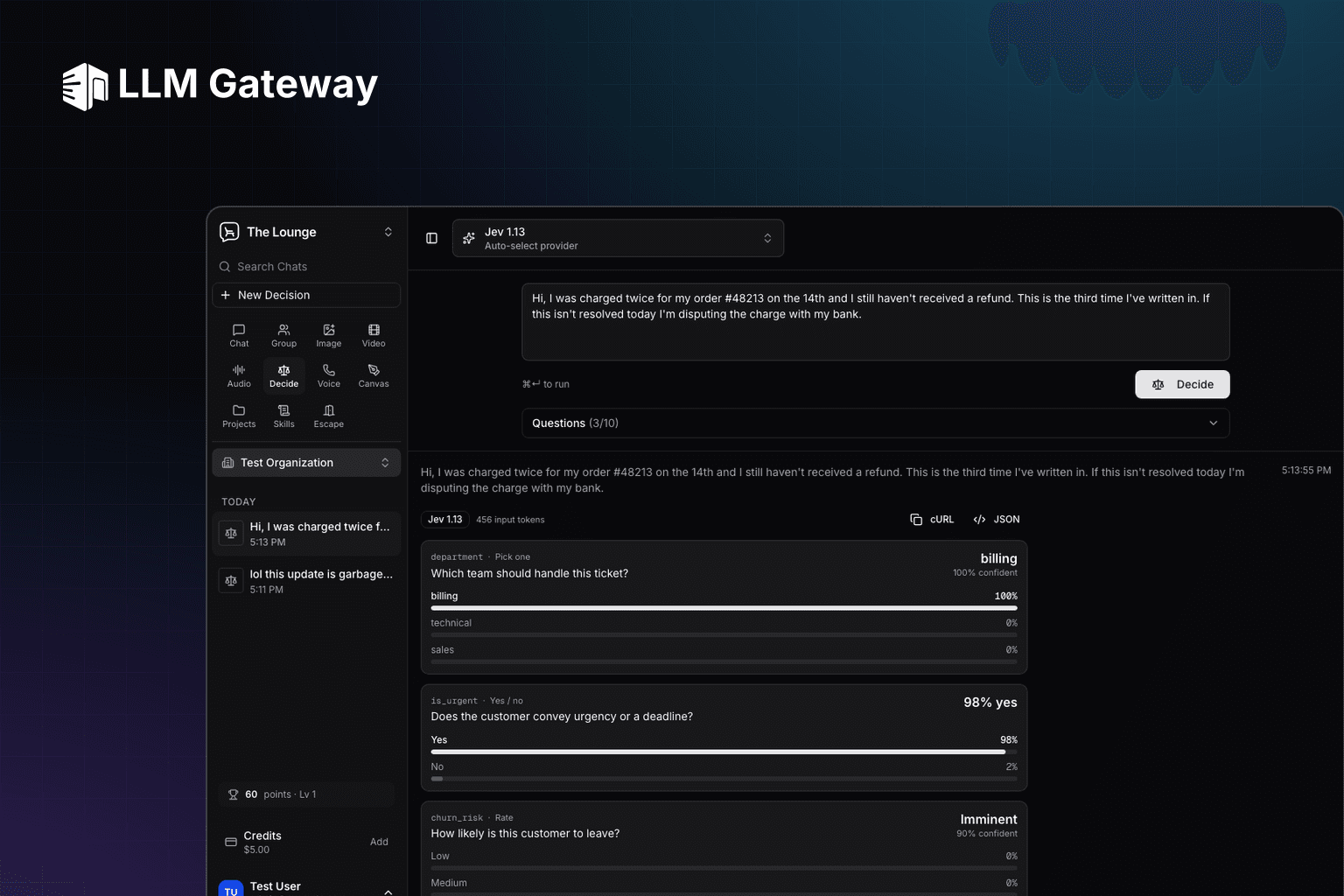
Trying a decision model has meant writing a request by hand: a JSON body with typed questions, a curl call, and a response you read as raw numbers. There was no place to paste a ticket, ask three questions and see whether the model agrees with you before wiring it into code. Decision Studio is that place: a new studio in Lounge at lounge.llmgateway.io/decisions that runs any decision model on your own text or images and shows every answer as a probability.
Build the questions in the browser
Paste the input, then add up to 10 questions of three kinds:
| Type | You define | Answer |
|---|---|---|
| Yes / no | Instructions | Probability the condition holds |
| Pick one | 2 to 12 options, descriptions optional | The chosen option and a probability per one |
| Rate | 2 to 10 ordered levels | The most likely level and a weighted score |
Those counts are the studio's limits; the API accepts up to 255 options per question.
Each question takes an optional name such as is_urgent that is echoed back in the answer, which is what your code would branch on. Six presets cover support triage, moderation, lead qualification, review classification, request routing and application screening, so the first run is one click.
Read the answer, not the JSON
Every answer renders as a card: the winning value in bold, a bar per option or level with its probability, and the model's confidence. A declined question shows as refused while the others are still answered. Turn on comparison mode to run the same input and questions on up to three decision models side by side.
Models with image input, such as gpt-6-luna-decisions, accept up to 4 pasted, dropped or picked images alongside the text, or on their own. Images are resized to 1536px in the browser before they are sent.
Copy the run as an API request
Every result has a cURL button that copies the run as the /v1/decisions request (attached images become a placeholder data URL), and a JSON toggle that shows the raw answers as the API returns them:
1curl -X POST "https://api.llmgateway.io/v1/decisions" \2 -H "Authorization: Bearer $LLM_GATEWAY_API_KEY" \3 -H "Content-Type: application/json" \4 -d '{5 "model": "jev-1.14.0",6 "input": "Hi, I was charged twice for my order and still have no refund.",7 "questions": [8 {9 "type": "choice",10 "name": "department",11 "instructions": "Which team should handle this ticket?",12 "choices": [{ "value": "billing" }, { "value": "technical" }]13 },14 {15 "type": "predicate",16 "name": "is_urgent",17 "instructions": "Does the customer convey urgency or a deadline?"18 }19 ]20 }'1curl -X POST "https://api.llmgateway.io/v1/decisions" \2 -H "Authorization: Bearer $LLM_GATEWAY_API_KEY" \3 -H "Content-Type: application/json" \4 -d '{5 "model": "jev-1.14.0",6 "input": "Hi, I was charged twice for my order and still have no refund.",7 "questions": [8 {9 "type": "choice",10 "name": "department",11 "instructions": "Which team should handle this ticket?",12 "choices": [{ "value": "billing" }, { "value": "technical" }]13 },14 {15 "type": "predicate",16 "name": "is_urgent",17 "instructions": "Does the customer convey urgency or a deadline?"18 }19 ]20 }'Runs are saved to your decision history with their input, questions and answers. Opening one loads it back into the editor so you can change a question or try another model, and saved runs earn Lounge points like the other studios (10 per run, up to 100 a day).
Decision models are billed on input tokens only, at the model's catalogue price: gpt-6-luna-decisions at $0.10 per million, microsoft-decision-1 and jev-1.14.0 at $0.042 per million. The studio draws on the same credit balance or membership allowance as chat.